Travel eSIM Guide: How Many GB You Need, and Whether Your Phone Supports It
Fact-checked June 29, 2026 · 4 sourcesHow we verify
The cleanest way to have data the moment you land is now an eSIM — no swapping SIM cards, no airport kiosk queue. But when you go to actually buy one, two questions stop most people: "How many GB should I get?" and "Does my phone even support it?" This guide answers exactly those two.
1. Does your phone support eSIM?
An eSIM only works if your device supports it. As a rule of thumb, most phones released from ~2018–2020 onward do — but where the phone was bought matters, so check before you pay.
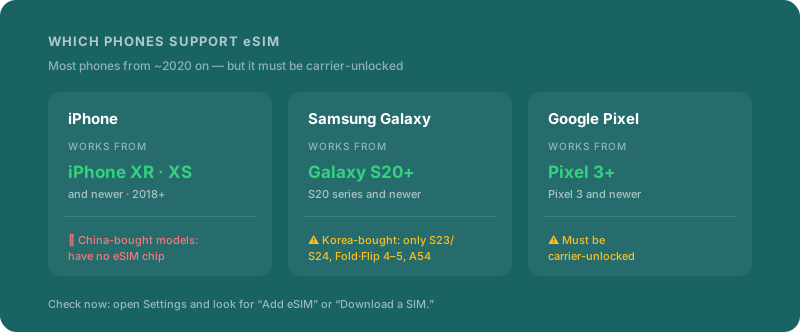
- iPhone: Every model from the iPhone XR, XS, and XS Max (2018) onward — the entire 11, 12, 13, 14, 15, 16, and 17 lineups, plus the SE (2020 and 2022).
- Samsung Galaxy: The Galaxy S20 series and newer flagships, Note 20, the Z Fold and Z Flip lines, and select A-series (A54/A55/A56). Regional variants differ — see the caveats below.
- Google Pixel: Pixel 3 and newer support eSIM; Pixel 7 and later can run two eSIMs at once.
Two conditions apply to all of them: the phone must be carrier-unlocked (not tied to a carrier contract lock), and it must not be jailbroken (iOS) or rooted (Android).
The fastest check is in Settings. On iPhone: Settings → Cellular → Add eSIM. On Android: Settings → Network & Internet → + next to SIMs, and look for "Download a SIM instead?" If you see it, you're good.
Watch out for regional variants
The same model can ship with or without eSIM depending on the country it was sold in:
| Where the phone was bought | eSIM support |
|---|---|
| Mainland-China iPhone or Galaxy | ❌ None (the eSIM chip is removed; dual physical SIM instead) |
| Hong Kong / Macau iPhone | Mostly ❌ (only 13 mini, 12 mini, SE 2020, XS) |
| US Galaxy S20, S21, or Note 20 Ultra | ❌ None |
| South Korea Galaxy before the S23 | ❌ Mostly none (only S23 and newer, Z Fold/Flip 4–5, A54) |
| Carrier-locked phone (any brand) | ❌ Must be unlocked first |
Note: US iPhone 14 and later are eSIM-only — no physical SIM tray at all. Phones sold in most other regions keep a physical SIM slot plus eSIM, so you can keep your home number on the physical SIM and add a travel eSIM alongside it.
2. How much data do you use per day?
To size a plan, first get a feel for your daily appetite. Travel usage usually falls into three buckets.
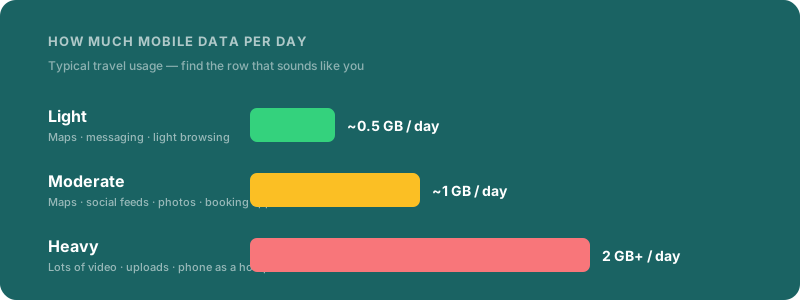
- Light (~0.5 GB/day): Maps for directions, messaging, the odd search. Photos upload on hotel Wi-Fi.
- Moderate (~1 GB/day): Where most travelers land — maps + social feeds + photo uploads + booking and translation apps.
- Heavy (2 GB+/day): Streaming video on the move, frequent uploads, or using your phone as a hotspot for a laptop.
If you're not sure, here's how fast each activity actually burns data:
| Activity | Data per hour |
|---|---|
| Maps / navigation | 5–10 MB |
| Text messaging | under 5 MB |
| Web browsing | 10–25 MB |
| Music streaming | 40–150 MB |
| Scrolling social feeds | 100–250 MB |
| Reels / TikTok (video-heavy) | up to 1 GB |
| Video calls | 300 MB–1 GB |
| Video, SD quality | 0.5–1 GB |
| Video, HD quality | 2.5–4 GB |
The takeaway: maps, messaging, and browsing barely move the needle — video is what eats data. If you mostly navigate, a small plan is plenty. If you'll stream on the train, size up.
3. How many GB for how many days?
Now multiply: trip length × daily usage. Find your row.
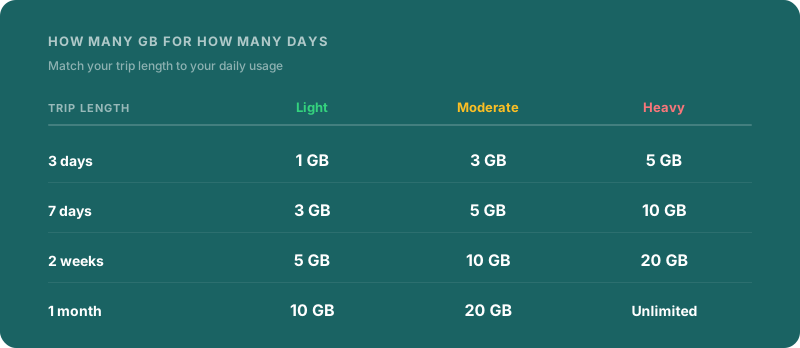
| Trip length | Light | Moderate | Heavy |
|---|---|---|---|
| 3 days | 1 GB | 3 GB | 5 GB |
| 7 days | 3 GB | 5 GB | 10 GB |
| 2 weeks | 5 GB | 10 GB | 20 GB |
| 1 month | 10 GB | 20 GB | Unlimited |
One tip: size slightly above your estimate. Running out and topping up mid-trip usually costs more than buying one tier larger up front. A "moderate" user on a 7-day trip should start at 5 GB — but if there's any chance of video or hotspot use, 7–10 GB buys peace of mind.
Unlimited makes sense when (a) the trip is long (2+ weeks) with heavy video/hotspot use, or (b) you'd rather not think about GB at all. Just know that most "unlimited" plans throttle speed (QoS) after a daily cap — read the fine print.
4. Beyond GB: what else to check
Two plans with the same GB can feel completely different. Check three things:
- What "unlimited" really means — truly uncapped, or "1 GB/day then slowed"? The latter is more common.
- Speed (QoS) — an unlimited plan throttled to 3G is a very different experience from one that stays on LTE/5G.
- Tethering / hotspot — if you'll share data to a laptop or tablet, avoid cheap plans that block tethering.
5. Which eSIM provider?
There are many, but they sort cleanly by personality:
- Airalo — the widest catalog (200+ countries and regions). A country plan almost everywhere, which makes it the easy default, especially for first-timers.
- Holafly — unlimited-data first. Good if you hate rationing GB or you're a heavy user (check whether tethering is allowed on the plan).
- Nomad — strong value and regional bundles. Best for budget travelers comparing $/GB and for multi-country trips on one eSIM.
No single right answer: a single country, short trip → a country data plan; several countries → a regional plan; a data glutton → unlimited.
6. Install before you fly, activate when you land
The trick is to install at home on Wi-Fi before departure:
- A few days before you leave, buy the plan and scan the QR code over Wi-Fi to install the profile.
- Install only — leave the line off. Most plans start counting from first connection / activation, not purchase.
- On arrival, switch the eSIM line on and turn data roaming ON for it. Done.
- Set your home SIM to "data off, calls/texts only" so you still receive bank and login verification texts on your home number without racking up roaming charges.
7. Pre-trip checklist
- Confirmed my phone supports eSIM in Settings (and isn't a no-eSIM regional variant)
- Phone is carrier-unlocked
- Picked my GB from trip length × daily usage (with a little buffer)
- For unlimited plans, checked the throttle (QoS) and tethering terms
- Installed the eSIM at home on Wi-Fi before flying
- Set my home SIM to data-off to avoid surprise roaming
Planning the trip those data days are for? Start with the PTO optimizer to turn your days off into the longest possible break, and if you're chasing travel rewards, see using credit-card points around a bridge day.
Device compatibility and data-usage figures can change with manufacturer and plan policies. Confirm with the eSIM provider and your phone maker before you buy.
Next Step
Match this trip idea to your PTO
See which holiday windows make this trip easiest to book, then set reminders before prices move.
Plan this trip windowGet booking-timing and PTO planning emails
Useful tools
Related Articles
Morocco in Late January: Cool-Desert Season, Half-Price Riads, and the Gap Before European Half-Term
Late January is Morocco's quietest workable window -- Marrakech at 65°F, Sahara tours in cool weather, riads at half the Christmas peak. Here is how it pencils out and how MLK Day bridges into it.
Napa and Sonoma in January: Cellar Season, Green Hills, and 40% Off Tastings
January is Napa and Sonoma's cellar season -- winemakers in the barrel room, tasting-room traffic down 60-70%, hotel rates 40-50% below harvest. Here is how the pricing pencils out and the MLK Day bridge that builds 9 days.
MLK Weekend to the Caribbean: Why Monday–Thursday Beats the Actual Weekend
MLK 2027 is the most mispriced holiday on the Caribbean calendar. The default Fri–Mon trip is the most expensive four days of January. A Sun–Thu return lands 30–45% cheaper with a longer trip. Here is the math.